Using Mathematica remotely

Using Mathematica remotely Using Mathematica from a terminal (no graphics) Using Mathematica from a terminal (X terminal) Using Mathematica from a terminal (graphics)
Labs Math21a
Interfaces can be a bleessing but also often come with more hassle than help. Some reasons are:
  • They are quite operating system dependent.
  • The are sensitive on the version of the software
  • Interfaces are rigid and contain more bugs, crash more often.
  • They eat valuable CPU and memory resources and slow down the computation.
  • They need quite a while to start up and litter your desktop.
In the case of Mathematica, users can struggle with printing, have problems with the concept of cells, with evaluating the cells, they are forced to use the editor which comes with the notebook instead of their favorate editor or have to decipher inadequate jaggy fonts.
Especially when people use Mathematica professionally, for example if they run processes over several days as batch jobs, parallel on differnet machines or together with other software like raytracing programs or C code, notebooks are no more used.
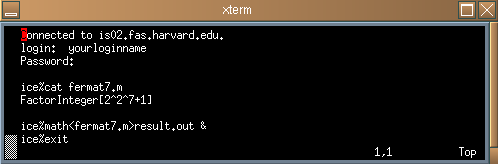
If you have some computation, which is expected to take some time you run it as a batch job. An example of such a session is
You can now logout and go to drink some coffee. If you come back, the seventh Fermat number is factorized. The result is written in the file result.out.