Using Mathematica remotely (III)
|
This guide works on all computers having access
to the web and all users with a FAS account. Especially,
you don't need to have Mathematica installed on your
machine.
|
|
1) Telnet to fas.
2) Grab remote.m from the webserver
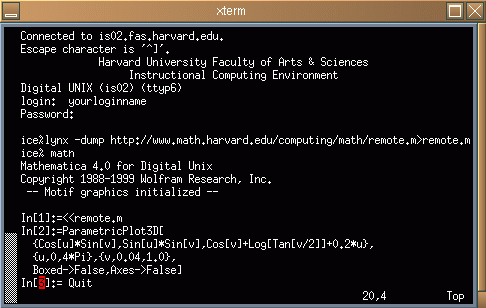
3) Start mathematica
4) Load in remote.m
5) Enter Mathematica code. The graphic output is in a PS file
test.ps and a GIF file test.gif
6) Publish it on your website or publish it as a PdF Document, or
simply print it out with "lpr test.ps".
|
Example:
lynx -dump http://www.math.harvard.edu/computing/math/remote.m>remote.m
ParametricPlot3D[{Cos[u]*Sin[v],Sin[u]*Sin[v],Cos[v]+Log[Tan[v/2]]+0.2*u},
  {u,0,4*Pi},{v,0.04,1.0}, Boxed->False,Axes->False]
Publish the picture on your website
1) If no directory public_html exists create it with
ice%mkdir public_html
|
2) Copy the picture test.gif into public_html:
ice%cp test.gif public_html
|
3) Make the picture accessible for the world:
ice% chmod 755 public_html; chmod 755 public_html/test.gif
|
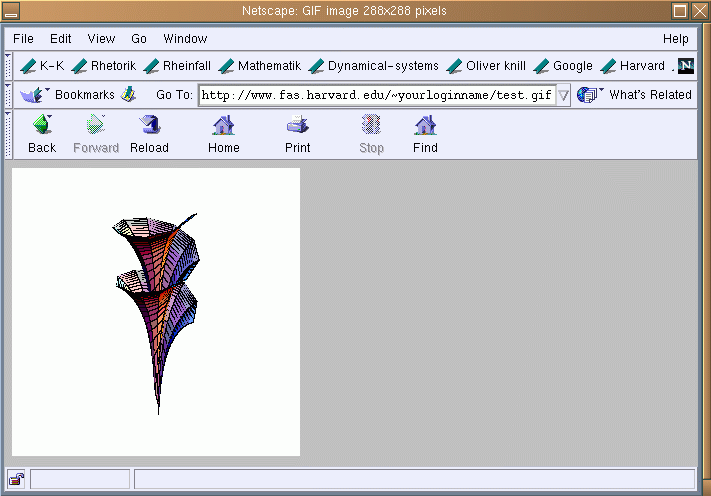
4) Point your webbrowser on your machine to the picture on
your website
http://www.fas.harvard.edu/~yourloginname/test.gif
|
If access is denied, you need to make your home directory accessible.
This can be done with
ice%cd; cd ..; chmod 755 `whoami`;
|
Publish it as a PDF document
Edit a file picture.tex containing the text
\documentclass{article}
\usepackage[dvips]{graphics}
\title{Math 21a, Solution of the homework problem}
\begin{document}
\maketitle
My solution to the Homework problem  \\
  \includegraphics{test.ps}
\end{document}
|
|
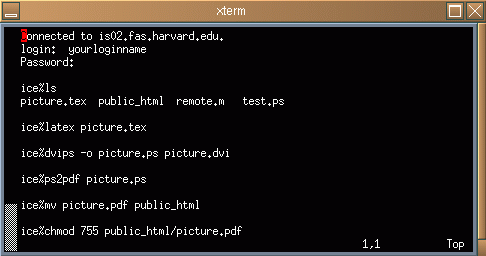
Process the LateX file, translate it into PS and then to PDF and
make it public.
|
|
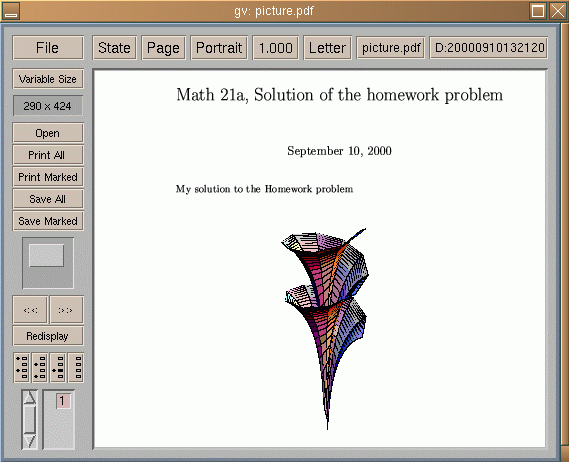
Depending on your operating system configuration, see either the
pdf document http://www.fas.harvard.edu/~yourloginname/picture.pdf
directly in the web browser, or using an external PDF
viewer:
|